

































Remove or deactivate an employee
When someone leaves or takes a long break, keep their hours and free up their user.
When someone stops working for you, you can deactivate them or remove them. Either way, their recorded hours, timesheets and leave stay in your reports. Owners and admins can do this.
Which one to choose
| Deactivate | Remove from company | |
|---|---|---|
| Use it when | Someone may come back: seasonal staff, long leave | Someone has left for good |
| Can they sign in? | No | Yes, but without access to your company |
| Do they take up a place on your plan? | No | No |
| Their history | Stays, and they stay in your employee list | Stays in your reports |
| Can you undo it? | Yes, reactivate them when your plan has room | They can join again with your company code, as a new member without their old role or PIN |
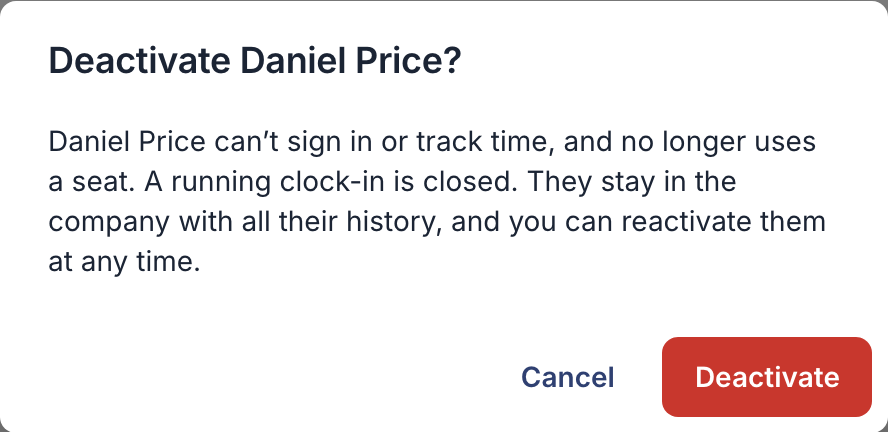
In both cases, a running clock-in is closed. When you remove someone, their upcoming shifts become open shifts and their pending leave requests are cancelled.
Deactivate or remove someone
On the web
- Open Employees in the menu.
- Click ⋯ at the end of the person’s row.
- Choose Deactivate or Remove from company.
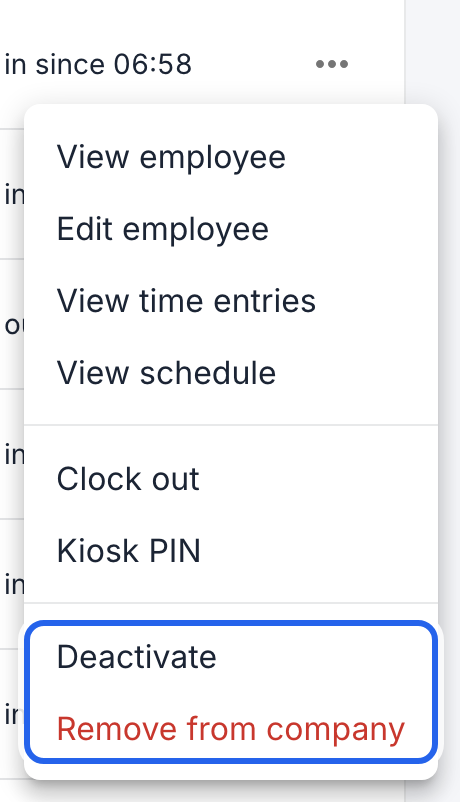
Both options are at the bottom of the menu.
- Read what happens, and confirm.
In the app
- Tap More, then Employees.
- Tap the person.
- Scroll down and tap Deactivate employee or Remove from company, and confirm.
Someone who never signed in shows Delete employee instead. If they have recorded hours, remove them on the web, so the hours are kept.
Reactivate someone
On the web
- In Employees, set the status filter to Deactivated.
- Click ⋯ in their row, choose Reactivate, and confirm.
In the app
- Tap More, then Employees, and tap the person.
- Scroll down, tap Reactivate employee, and confirm.
They can sign in and track time again, and take up a place on your plan again. If your plan is full, add a user first.
Good to know
- Your bill doesn’t change by itself. Deactivating or removing someone frees a place, but your plan keeps the same number of users. To pay for fewer, see Change your plan or users.
- You can export their hours after they leave: see Export hours for payroll.
- The owner can’t be deactivated or removed. Only the owner can deactivate or remove another admin.